
Why Are Some PDFs True Vector Files While Others Are Just Images Inside a PDF?
In the digital age, PDFs have become the universal language of document exchange, offering a reliable way to share everything from intricate artwork to simple invoices. Yet, have you ever wondered why some PDFs seem razor-sharp at any zoom level, while others turn blurry or pixelated? The secret lies in the fundamental difference between true vector PDFs and PDFs that only contain embedded raster images. If you've struggled with logo print quality or wondered how to keep your designs crisp for every application — from business cards to billboards — understanding this distinction is essential. In this article, we’ll explore the technical roots, practical implications, and solutions for optimizing your PDFs for every creative and business purpose.
The Anatomy of a PDF: Vector vs. Raster Content
To understand why PDFs differ, let’s start with the basics. A PDF, or Portable Document Format, can serve as a container for various types of content, from text and images to hyperlinks and interactive elements. When it comes to graphics, two main types can be embedded: vector graphics and raster (bitmap) images.
Vector graphics are created with mathematical formulas, representing shapes, lines, and curves as scalable paths. This means a vector-based PDF can be zoomed or resized infinitely without losing clarity. In contrast, raster images are made of individual pixels, which will blur or look jagged if scaled beyond their intended resolution. In practice, this means that a PDF made from "true" vector artwork maintains perfect sharpness at any size, while a PDF created by simply embedding a flat image will start to degrade when enlarged.
What Is a True Vector PDF?
A true vector PDF is often the gold standard in professional printing and design. These files are directly generated from vector art services online, professional illustration software like Adobe Illustrator, or through specialized vector conversion service. Every element—be it a logo, drawing, or typographic design—is described by mathematical paths. Key features of a vector PDF include:
- Scalability without loss of quality
- Editable shapes and colors, supporting quick adjustments
- Efficient file sizes for complex graphics
- Perfect compatibility with commercial printing requirements
Such versatility makes vector PDFs the preferred format for logos, illustrations, technical drawings, and any design requiring frequent resizing or consistent quality across mediums.
When a PDF Is Just an Image In Disguise
Not all PDFs are created equal. It's possible to create a PDF by scanning a drawing, taking a photo, or exporting artwork as a flattened image and then inserting it into a new PDF. While technically a PDF, such documents only contain embedded raster images and inherit the limitations of those images—namely, fixed resolution and loss of clarity when scaled. This becomes evident when you attempt to print a logo from such a PDF onto a large banner or sign: the result is often disappointing, with jagged edges and blurred details.
Why does this happen? Sometimes, file creators are unaware of the benefits of vector formats, or lack access to original vector artwork. Other times, the workflow—such as saving from a graphics editor as a JPEG or PNG first—inadvertently strips vector data, leaving only a flat image.
How to Identify If Your PDF Is True Vector or Just an Image
Detecting the difference doesn’t require advanced software. Here’s how to check:
- Zoom Test: Open the PDF and zoom in at 400% or more. True vector elements will remain crisp, while images will blur and show pixels.
- Selection Tool: Use your PDF viewer's selection tool to click on shapes or text. If individual elements can be selected independently, it’s vector-based; if the entire page is selected as one unit, it’s a raster image.
- File Size: While not conclusive, vector PDFs with complex designs may have smaller file sizes than high-resolution raster image PDFs.
Some online tools or professional vector conversion software also help differentiate between vector and raster elements within PDFs.
Why True Vector PDFs Matter for Printing and Design
For professionals in marketing, screen printing, product design, or promotional merchandise, the distinction is more than technical—it’s critical to project quality. Vector PDFs ensure colors are separated accurately for screen printing, graphics can be adjusted or recolored with ease, and files are ready for any size without any loss of fidelity. By comparison, image-based PDFs often require additional work to restore or vectorize the artwork before print, increasing turnaround time and cost.
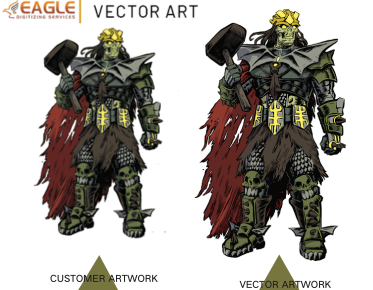
This is why businesses, agencies, and creators rely on specialized vector conversion services. Providers like Eagle Digitizing employ skilled digitizers and cutting-edge technology to convert existing raster images into true vector artwork. They handle everything from raster to vector conversion, vector logo design, color corrections, and advanced image retouching. Their solutions cover a spectrum of applications—from apparel printing and signage to custom decals and digital marketing assets—offering a seamless route to production-ready, scalable PDFs.
How Are PDFs Created with Vector and Raster Content?
Common Creation Workflows
The path to a PDF determines its underlying structure. Vector-based PDFs are usually exported directly from vector illustration programs. For example, a logo designed in Adobe Illustrator or CorelDraw, when saved as a PDF, retains all vector properties. In contrast, Photoshop—being a raster image editor—will export flat image-based PDFs unless the file contains vector smart objects.
Common ways true vector data becomes lost include:
- Exporting artwork as a JPEG, PNG, or TIFF before PDF creation
- Scanning artwork and saving the scan inside a PDF
- Flattening artwork to merge all layers, eliminating vector paths
To avoid these pitfalls, always export from vector editing programs when vector fidelity is crucial.
Benefits of Professional Vector Art Services
Whether you're a print shop, marketing agency, or graphic designer, your brand presence relies heavily on clear, crisp visuals. That’s where professional vector art conversion services add value. Leading service providers understand not only the intricacies of converting images to digital vectors but also industry standards across printing and promotional goods. They deliver logo conversion, vector tracing, image vectorization, and custom color separation to suit business-specific requirements.
Providers like Eagle Digitizing are equipped to support small to midsize businesses, offering flexible pricing and rapid turnaround—often within hours. They’re not just technical converters, but partners who understand the vision and branding requirements unique to every client. Their comprehensive offering covers all relevant file formats, from PDF and SVG to AI and EPS, supporting marketing, screen printing, promotional, and wholesale needs. This extensiveness ensures that your project, regardless of complexity, is handled with expertise and care, streamlining the process from concept to execution.
When and Why to Convert Images to Vector for PDFs
There are many use cases where converting raster images into vectors is not just recommended, but necessary. For instance:
- Logos: Guarantee clarity on everything from pens to billboards
- Stickers and Decals: Ensure cut lines are precise and colors are solid
- Large-format Printing: Avoid visible pixels and maintain sharpness for banners and signs
- Apparel Printing: Support color separation for screen printing or embroidery
This is why so many businesses use vector conversion services: they take photos, scanned drawings, or flat images and professionally convert them into print-ready, scalable vector artwork in the correct PDF format. This not only speeds production but protects your brand integrity in every use case.
Frequently Asked Questions About PDF Vectorization
1. Can I convert any image inside a PDF to vector?
Yes, but the process varies in complexity based on the quality and detail of the original image. Tools and professional services use manual tracing or automated algorithms to create vector paths that replicate the original art. For businesses without access to high-end design software, outsourcing to specialized providers ensures accuracy and speed.
2. Will all colors and fine details transfer during vectorization?
High-quality vectorization captures most shapes and colors, though gradients and photo-realistic images may require advanced techniques or some simplification. However, elements like crisp text, logos, and illustrations are replicated with precision, retaining fidelity even at the largest scales.
3. Are vector PDFs always better than image PDFs?
For reproduction, editing, and scalability, yes—vector PDFs are almost always the smart choice. The exception may be for documents primarily composed of photographs, where raster images are necessary. For business graphics, logos, technical diagrams, and promotional materials, vector is the clear winner.
Best Practices for Maintaining Vector Quality in PDFs
Follow these guidelines to maximize the power of your PDFs:
- Always start with vector artwork and export directly to PDF from vector design software
- Avoid unnecessary flattening or rasterization during editing
- Use high-quality vector graphics converter tools or trusted professional services when converting images
- Maintain original, editable design files (.ai, .svg, .eps) alongside the final PDFs for future edits
By keeping these practices, you preserve the adaptability and professional polish your graphics deserve.
The Future of Vectorization in Digital and Print Media
The drive toward automation, consistency, and brand integrity means vector PDFs will only grow in importance. As client demands shift toward multi-purpose graphics that suit everything from websites to high-visibility outdoor signage, the ability to work in flexible, non-destructive formats becomes vital. Emerging technologies in AI-driven vectorization, cloud-based graphics editing, and real-time collaboration are poised to make conversion even easier and more precise, benefiting creative professionals and businesses alike.
If you’re committed to elevating your visual assets and eliminating quality issues before they reach print, it’s time to evaluate your workflow and consider strategic investments in vector art conversion. Whether you create in-house or rely on expert partners, the resulting confidence and clarity will speak volumes for your brand—at any scale.