
Why Thin Lines Disappear in Embroidery
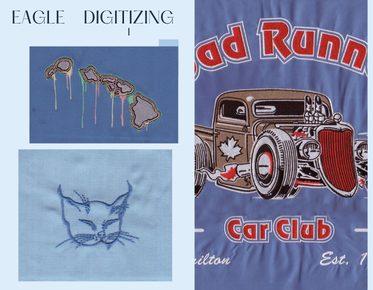
Thin lines disappear in embroidery when the artwork is too narrow for the fabric, the embroidery digitizing is too light, or the stitches do not have enough support to stay visible after sewing.
To keep fine details readable, the design needs proper width, balanced pull compensation, and a production-ready stitch plan. If you are preparing a logo, Quote Now or Upload Your Design for a quick review before production starts.
What Actually Happens to Thin Lines
Embroidery is not printed ink. A thin line has to be built from thread, and thread takes physical space. When a line is smaller than the machine can hold cleanly, it may sink into the fabric, break apart, or blend into nearby stitches.
That is why a clean embroidery design on screen can still fail once it reaches the hoop. The problem is usually not the idea itself, but the way the artwork behaves under real stitching pressure.
Why Fabric Choice Changes the Outcome
Some fabrics support detail better than others. Heavy twill, canvas, and structured caps can hold tighter shapes, while stretchy knits, fleece, and textured garments can hide narrow strokes faster.
When the embroidery fabric moves, fine lines distort first. A thin rule that looks sharp in a mockup may disappear after the garment stretches, compresses, or shifts during stitching.
Stitch Density and Line Width Must Work Together
If the stitch field is too sparse, a thin line loses body and disappears. If it is too dense, the thread can crowd the fabric and push the line out of shape. Good stitch density balances visibility with stability.
For custom embroidery, the digitizer has to match density to the actual line width, not just the artwork file. That adjustment is often the difference between a clean outline and a faint mark that vanishes in production.
Stitch Direction Controls How the Eye Sees the Line
Thin artwork does not only depend on width. Stitch direction affects how thread reflects light, how the line bends around curves, and how much pull the fabric receives as the machine runs.
A good direction plan helps the line look intentional instead of fragile. Poor direction can make a narrow stroke twist, flatten, or break visually when the garment is worn or washed.
Underlay Gives Small Shapes a Backbone
Underlay helps support the stitches above it, especially when a design includes slim strokes, tiny lettering, or close spacing. Without it, the thread may sit too loosely on the fabric and lose definition.
That support matters in production embroidery, where garments must look consistent across many pieces. A stable base can protect the design from sinking into soft or uneven material.
Small Lettering Has a Practical Limit
Very small text is one of the most common reasons thin lines disappear. At a certain point, letters need more room than the logo layout allows, especially on caps, sleeves, and left-chest placements.
This is where smart embroidery layout decisions matter. Instead of shrinking everything, a digitizer may enlarge key strokes, simplify a font, or separate elements so the brand stays readable.
Clean Artwork Creates a Better Stitch File
Bad source art often hides the real problem. Low-resolution files, fuzzy outlines, and broken vectors make it harder to see which details are safe and which details are too fragile for sewing.
A clean stitch file starts with cleaned-up artwork, then gets converted into shapes the machine can actually sew. That workflow is essential when the goal is to preserve fine details without overcomplicating the design.
Vector Cleanup Can Save a Thin Logo
Before stitching begins, the artwork should be checked for uneven edges, stray points, and unnecessary shapes. If the source file is messy, the resulting embroidery may inherit that mess and make thin lines even weaker.
Professional file prep often includes vector conversion and cleanup so the design has a clear structure. That step helps the digitizer protect the important parts of the logo and remove elements that will not survive production.
Sew-Out Testing Reveals Hidden Risk
A screen preview cannot show how thread will behave on a real garment. Sew-out testing reveals whether a line is too faint, too crowded, or too sensitive to fabric movement.
This test is often the fastest way to catch a problem before bulk production. It also helps verify whether the final result matches the intended embroidery detail instead of losing it on the machine.
When a Logo Needs Simplification
Not every thin line should be forced into embroidery. Some artwork needs simplification, thicker stroke choices, or spacing changes so the finished piece remains sharp and usable on apparel.
The best embroidery logo results usually come from realistic adjustments, not from trying to preserve every pixel. That is especially true for small placements where the garment size limits what the machine can hold.
How a Professional Workflow Reduces Rework
A production-minded team looks at the art, the garment, and the placement before building the file. That process helps prevent embroidery distortion, broken edges, and lines that disappear after the first run.
Eagle Digitizing follows a practical preparation workflow that focuses on real sewing behavior, not just visual cleanup. If you need a design checked before production, Get a Free Estimate and send the artwork for review.
FAQ
Why do thin embroidery lines disappear on garments?
They disappear when the line is too narrow, the fabric is unstable, or the stitch plan does not give the thread enough support. Small strokes need more structure than a simple graphic file provides.
Can every logo keep its thin details in embroidery?
No. Some details are too small for clean stitching, especially on soft fabric or small placements. The best result often comes from adjusting the design before digitizing.
How do I keep small text readable in embroidery?
Use cleaner artwork, avoid shrinking the design too far, and ask for a production-ready file review. A test sew-out also helps confirm whether the text will stay visible.
Keep Thin Details Visible in Production
Thin lines disappear because embroidery has physical limits, but those limits can be managed with better file prep, smarter design decisions, and stronger production planning. When a logo is built for real stitching, the result looks cleaner, lasts longer, and represents the brand better.
If you are preparing a difficult logo or small lettering for custom apparel, Eagle Digitizing can help you move from artwork to a usable file with less guesswork. Contact Us today to start your next embroidery project with more confidence.