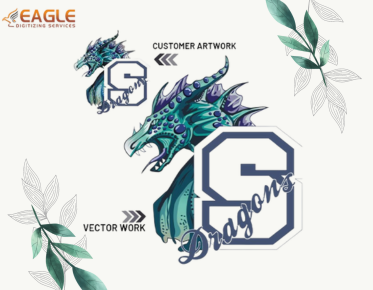
.png "vector art service")

Common Problems Hidden in Low-Quality Vector Files
The Hidden Perils of Poor Vector Quality
As digital design and printing evolve, the demand for precision and sharpness in visual assets is at an all-time high. Vector files, which boast scalability without loss of fidelity, have become the backbone of modern graphics, branding, and product design. Yet, not all vector files are created equal. Hidden beneath the surface of low-quality vector files are a slew of problems that can derail production processes, inflate costs, and tarnish your brand's visual impact.
Whether you’re a print shop operator, graphic designer, or business owner, understanding vector conversion service intricacies and the consequences of low-quality files is essential. Navigating these pitfalls is key to producing stunning, professional results.
What Makes a Vector File “Low-Quality”?
Vector graphics are constructed from mathematical equations, not pixels, allowing them to scale cleanly for any application. However, several factors can degrade vector file quality:
- Excessive anchor points and unnecessary nodes, making files bulky and hard to edit.
- Rough or uneven paths resulting from auto-tracing poorly drawn images.
- Lack of clean separation between overlapping elements.
- Incorrect or inconsistent color usage—especially problematic for branded assets.
- Improper use of layers, grouping, and file formatting.
- Missing or corrupt data when exporting or saving files in common formats (.AI, .SVG, .EPS, etc.).
These subtle imperfections can stay hidden until production or scaling exposes them, often at the worst possible moment.
Scalability Nightmares: Blurry Prints and Jagged Edges
The promise of vectors is that they can be enlarged indefinitely. But if your source file is compromised by rough paths or poorly converted elements, those flaws will become alarmingly visible. Blurry lines, jagged edges, and disproportionate elements can all emerge during scaling—undermining the polished look you need for large format banners, vehicle wraps, or signage. Often, the culprit is quick-and-dirty vector art services that rely on automated tools with minimal manual correction.
Brand Consistency at Risk: Color and Detail Issues
Branding relies on precision. If a low-quality vector file doesn’t adhere to exact color codes or leaves gradients, shadows, or fine details misrepresented, your logos and assets can suddenly look “off” across various products. This can impact everything from promotional products to digital assets. Consistent color separations and sharp detail are particularly important if you plan to use the artwork for screen printing or embroidery, where technical accuracy is paramount.
Overly Complex Files Slow Down Workflows
A surprising issue with low-quality vectors is excessive file complexity. Auto-tracing software can generate thousands of unnecessary points and paths, making the file heavy and difficult to manage. This not only hampers editing but also causes lag in design software and longer output times in RIP (Raster Image Processor) systems for printing or cutting. Clean, optimized paths are not just an aesthetic preference; they are critical for efficient, professional workflows.
Hidden Errors: Structural Flaws and Production Failures
Mistakes such as open paths (not fully closed), stray points, or unjoined lines often go unnoticed until production. These errors might mean a seemingly finished design won’t cut or print correctly, resulting in wasted materials, time, and money. For complex applications like laser engraving or vinyl cutting, hidden artifacts can force entire batches into the discard pile.
Compatibility Issues with Software and Hardware
Not all vector files export or import seamlessly, especially if filled with corrupted, incompatible, or version-specific data. Designers frequently encounter problems when exchanging files across different platforms or sending them to printers, embroiderers, or promotional suppliers. File corruption, unsupported effects, or missing fonts can lead to unpredictable, costly results and unnecessary back-and-forth between teams.
Impact on Embroidery and Specialty Applications
For industries such as embroidery and apparel decoration, hidden vector issues are particularly problematic. Stitches may not align, or complex fills may break up, leading to unsatisfactory embroidery results. Engraving and cutting machines also require perfectly formed paths without redundant data. Partnering with specialists who understand the nuances of these applications is crucial.
The Eagle Digitizing Advantage: Professional Vector Solutions
One way to safeguard against hidden problems in vectors is to enlist the help of specialist providers. Eagle Digitizing, for example, prides itself on delivering highly accurate, print-ready vector conversions for a wide range of industries. Their process doesn’t stop at simple conversion: they optimize paths, guarantee color and layer fidelity, and check every file for errors that could cause downstream issues.
Their services go beyond basic vectorization service. With a seasoned team and fast turnaround times, Eagle Digitizing efficiently manages both simple and complex artwork, delivering files that work perfectly for screen printing, embroidery, signage, and more. Their clients—ranging from marketing agencies and print shops to custom t-shirt makers and graphic designers—benefit from clean, scalable vectors that are ready for any application.
Eagle Digitizing’s commitment to quality means they handle tasks such as raster to vector conversion, background removal, color correction, and even color separation for print. Their wide array of output formats (.PDF, .SVG, .AI, .EPS, .CDR, .DXF, etc.) further ensures full compatibility, no matter the production environment.
Safeguarding Your Results: Best Practices for Vector File Quality
Start With the Right Service
With so much at stake, don’t cut corners on file preparation. Quality vector artwork conversion involves more than just a software click—it demands the eyes and expertise of skilled professionals who catch subtle flaws that automated tools miss. Even with basic in-house edits, always review files at full size and inspect the vector paths for excess complexity or stray elements before considering production.
Optimize and Review File Structure
Confirm that all paths are properly joined, colors are consistent, and groupings are logical. Each vector file should be lightweight and editable, saving you headaches in the revision or scaling stages. When working with external suppliers, request samples or proofs before full production to catch issues before they multiply.
Maintain Branding Integrity
Double-check color codes, brand elements, and the positioning of every detail. With frequent use across multiple products, even tiny inconsistencies can erode brand presence and credibility over time.
Use Reliable Storage and Backups
Data loss and file corruption are surprisingly common, especially with frequent collaboration and file sharing. Maintain organized storage, use versioning, and keep backups to prevent sudden workflow interruptions.
Looking Ahead: The Evolving Demands of Vector File Quality
As trends shift toward personalized products, short-run printing, and complex branding campaigns, the necessity for flawless vector files only grows. Advances in automation and AI-powered vectorization tools may help reduce some manual effort, but nothing replaces the skill and oversight of experienced professionals—especially for intricate or mission-critical projects.
Businesses that invest in reliable vector art conversion services and educate their teams on recognizing red flags in vector files will find themselves ahead as the industry moves toward higher standards of accuracy and efficiency. As your visual identity grows ever more essential to your success, vigilance in vector file quality will remain a competitive differentiator.
How aware are you of the vector files you rely on daily? Are you confident they’re up to the challenge as your brand and production needs evolve? Taking a proactive stance on quality now will save time, resources, and reputation in the long run—fueling creative freedom without technical constraints.