
Top 5 Vector Design Mistakes and How to Avoid Them
In the world of graphic design, vector art is a powerful medium that allows designers to create scalable and high-quality images that remain crisp regardless of size. However, even seasoned designers can fall prey to common vector design mistakes that can reduce the effectiveness of their artwork. By understanding these pitfalls, designers can produce superior vector graphics with confidence. In this blog, we’ll explore the top five vector design mistakes and how to avoid them, ensuring your creations are both visually striking and efficient.
1. Ignoring File Compatibility
One major mistake designers make is not considering file compatibility. Vector graphics can be saved in various formats such as AI, EPS, SVG, and PDF. Each format has its advantages and specific software compatibility. Choosing the wrong format can lead to loss of quality or inability to open the file. To avoid this, always confirm the required file format for your project and ensure your design software supports it. Software like Adobe Illustrator or CorelDRAW is ideal for handling a wide range of vector formats.
Using the Right Tools
Employing the correct tools is essential for effective vector design. Applications that specialize in vector creation, such as Adobe Illustrator, provide advanced options for creating precise and editable vector artwork. It's vital to keep your software updated to access the latest features and enhancements. Platforms like Eagle Digitizing offer a plethora of vector design services for design professionals looking to optimize their workflow.
2. Overlooking Design Hierarchy
A common mistake in vector design is failing to create a visual hierarchy. This can make comprehending the artwork challenging for viewers. Hierarchical arrangement is achieved by using diverse font sizes, colors, and positioning to emphasize particular elements within the design. Designers should plan their compositions meticulously, ensuring focal points are clear and the elements guide the viewer's eye effectively.
Balancing Elements
Elements within the design should be balanced to create a harmonious overall appearance. When parts of an artwork clash, it can lead to visual chaos and detract from the intended message. Understanding the basics of design balance can go a long way, ensuring that no single element overshadows another unless deliberately intended. Professional vectorization services often incorporate best practices for achieving balanced designs.
3. Neglecting to Optimize Paths
Path optimization is crucial in vector graphics to ensure smooth and efficient designs. Overcomplicated paths with excessive anchor points can result in bloated file sizes and slower rendering times. This is especially problematic for online applications where performance is key. Designers should learn to simplify paths while maintaining the integrity of their designs. Tools within vector software can assist in reducing unnecessary points and merging overlapping paths effectively.
Efficiency is Key
Efficiency should not only apply to design but also to workflow. By utilizing adjustments such as path simplification, designers can ensure their vector art is both lightweight and effective. This involves using software that offers robust path editing capabilities and maintaining a streamlined approach throughout the design process. Websites like Vector Magic provide resources and tools aimed at optimizing vector paths.
4. Inappropriate Use of Gradients and Colors
While gradients and a wide range of colors can enhance a vector design, their overuse or misuse can lead to a cluttered and unprofessional appearance. Gradients should be used sparingly to highlight or add depth to certain design elements. Likewise, color schemes should be carefully selected to maintain visual appeal and convey the intended message efficiently.
Mastering Color Schemes
By understanding color theory, designers can choose colors that harmonize well and evoke the desired emotional response. Also, accounting for how colors appear on different screens or in print is essential. Services like vector artwork conversion can ensure that your color choices are rendered correctly in various formats and outputs.
5. Not Preparing for Scalability
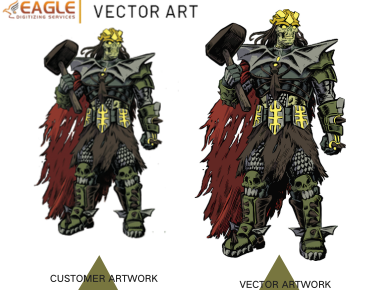
The essence of vector graphics lies in their scalability. However, if not designed with scalability in mind, certain elements may distort when resized. Designers should create each component of their artwork to maintain its shape and appearance at any size. This includes using vector text where possible and carefully considering stroke weight and effects that might not scale well.
Future-Proofing Designs
Designers should anticipate future requirements and design their vector files to be versatile. This might involve setting up vector files with dynamic characteristics that adjust when scaled. Detailed planning and testing of files at various sizes can prevent issues related to scaling. Companies such as Eagle Digitizing offer comprehensive vector and digitizing services that help manage these challenges effectively.
As vector graphics continue to play a vital role in digital media and print, it's essential to understand these common pitfalls and the strategies to avoid them. By refining your approach with these aspects in mind, your vector designs can achieve a level of professionalism and quality that stands out. As the industry evolves, staying informed and adopting best practices in vector design will only enhance your creative output. What could be the next big trend in vector design that could redefine how we perceive and create digital graphics?