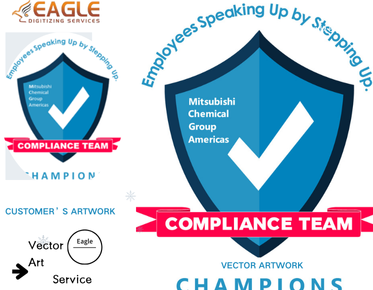

How to Find and Replace the Font during Raster to Vector Conversion?
Fonts play a crucial role in defining the style and readability of a design, especially when it comes to converting raster graphics to vector format. Transitioning from a raster to vector format involves converting images that are pixel-based to a format that is based on mathematical instructions, allowing for infinite scalability without loss of quality. This process can offer challenges when it comes to text, particularly if the original font isn’t available or doesn’t convert well. In this guide, we'll walk you through the necessary steps to find and replace fonts during raster to vector conversion efficiently and effectively.
Understanding Raster and Vector Formats
Before diving into font replacement during conversion, it's important to understand the fundamental differences between raster and vector formats. Raster images are composed of pixels, each carrying a specific color value, such as JPEG, PNG, and BMP files. These files often become pixelated when enlarged. Vector images, however, are composed of paths defined by a start and end point, along with curves and angles, represented commonly in formats like SVG, AI, and EPS. This mathematical equation approach allows vector images to be resized without any loss of quality, making them ideal for logos and other scalable designs.
Identifying Fonts in Raster Images
The first step in the conversion process is accurately identifying fonts in your raster images. This can be achieved using tools or software that provide OCR (Optical Character Recognition) capabilities. OCR software scans the text in your images, recognizing the font characteristics such as stroke, serif or sans-serif features, and weight. Some advanced vector conversion software offers integrated raster to vector services that include robust font identification features.
Verifying the Font Availability
Once you have identified the font, verify its availability in your digital library. Often, design files might have fonts that are either non-standard or customized variants, making it necessary to either purchase or recreate the font. In case the identified font is unavailable, vector conversion tools or professional services like Eagle Digitizing can help bridge the gap with vector conversion services that facilitate accurate font replication or substitution with close matches.
Utilizing Vector Conversion Software
Leveraging professional software designed specifically for vector conversion tasks is crucial for the accuracy and quality of the final output. Softwares like Adobe Illustrator and CorelDRAW are renowned for their comprehensive tools that handle font conversion effectively. When the specific font in raster images is recognized, these software programs offer features that allow users to replace the fonts seamlessly.
Replacing Fonts During Conversion
After you've identified and prepared the required fonts, the next step is to replace the existing fonts in the raster image during its conversion to vector format. This involves using vector drawing tools to manually trace the text if necessary or importing the exact font into the vector work area and positioning it to match the original layout accurately. Online platforms also provide online vector conversion services that can automate much of this process, ensuring consistency and precision throughout.
Finalizing and Exporting the Vector File
Once the fonts have been replaced and the vector image has been refined to your satisfaction, the final task is to export the file in a format suitable for its intended use. Common vector file formats include AI, EPS, and PDF. By maintaining flexible scalability, these formats ensure your design is ready for any application, from print to digital display.
Considering Professional Assistance
If you find the font replacement process during raster to vector conversion daunting or if you are dealing with a high volume of conversions, it might be worthwhile to consider professional assistance. Companies like Eagle Digitizing offer specialized vector conversion services, providing expertise and tools that handle everything from raster to vector conversion to precise font management. Their experience ensures that clients receive high-quality, scalable vector files that meet specific requirements without the usual hassle.
As the landscape of digital design continues to evolve, the importance of transitioning from raster to vector formats becomes increasingly significant. Designers and artists can elevate the quality and versatility of their work by embracing these methodologies and tools, ensuring that their designs are not only visually compelling but also technically robust.
What new tools or practices can you explore to enhance your raster to vector conversion process further? The scope of this endeavor presents opportunities for innovation and improvement, allowing designers to push the boundaries of what vector graphics can achieve.
.png "vector art service")