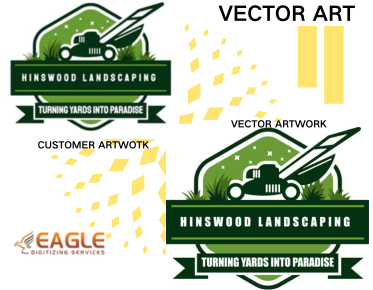
How Can I Convert a JPG to Vector Format?
Understanding the Basics of Vector Conversion
Converting a JPG to a vector format is essential for many graphic design and printing projects. Vector images are scalable without losing quality, making them ideal for various applications. They consist of paths defined by mathematical expressions, unlike raster images made up of pixels, which can become pixelated when enlarged.
The Process of Vector Conversion
The simplest way to convert a JPG to a vector format is to use a technique called image tracing. Software like Adobe Illustrator and CorelDRAW are commonly used for this purpose. These programs can trace the outlines of the image and convert it into a vector format like SVG, AI, or EPS. By tracing the image, the software transforms it into scalable lines and shapes, allowing for adjustments and edits without sacrificing quality【4:0†source】.
Step-by-Step Guide to Converting JPG to Vector
Using Adobe Illustrator
Adobe Illustrator is a popular choice among graphic designers for vector conversion. Here's a simple guide:
- Open Adobe Illustrator and create a new document.
- Import your JPG image by going to File > Place.
- Select the image and click on "Image Trace" on the toolbar.
- Adjust the tracing options in the "Image Trace" panel to suit your needs. You can tweak settings like threshold and paths to refine the traced image.
- Once satisfied, click "Expand" to finalize the vectorization.
- Save your new vector file in your desired format (e.g., SVG, AI, EPS).
Using Online Tools
If you prefer not using complex software, there are numerous online vector conversion services available. Websites such as Vector Magic and Convertio allow you to upload your JPG and download the converted vector file in minutes. This option is usually user-friendly and doesn't require installation【4:1†source】.
Professional Vector Conversion Services
For intricate designs or when you lack time or expertise, professional services like those provided by Eagle Digitizing can be invaluable. Eagle Digitizing offers comprehensive vectorization services, converting intricate artworks into clean and scalable vector files. Their experienced team handles each project with precision, ensuring high-quality results that maintain the essence of the original design【4:2†source】.
Exploring the Benefits of Vector Graphics
Using vector graphics instead of raster images comes with several advantages:
- Scalability: Enlarging vector graphics does not degrade their quality, unlike raster images, which can pixelate.
- Editability: Vector files are easier to modify and ideal for creating logos or designs that need regular updates.
- Efficiency: Vector files tend to be smaller than raster files, making them easier to share and load quickly on websites【4:4†source】.
Potential Challenges and Considerations
While vector conversion offers many benefits, it also comes with challenges. Auto-conversions may not perfectly capture intricate details or subtle gradients. Manual adjustments are often necessary to perfect the conversion. Understanding the complexities of vector tools and configurations can also require a learning curve.
Choosing the Right Vector Format
When converting a JPG to a vector format, selecting the appropriate output format is crucial. The most common vector formats include SVG, AI, EPS, and PDF. Each has specific uses; for instance, SVG is suitable for web graphics, AI for Adobe Illustrator, and EPS for broader compatibility with other design software【4:0†source】.
Looking Forward: Future Trends in Vectorization
As technology advances, the process of vector conversion is expected to become even more seamless and automated, integrating AI technologies that enhance conversion accuracy and detail retention. Moreover, vector file formats might evolve to support more complex visual data, accommodating the growing needs of digital designs and applications.
Whether you're a graphic designer, a print professional, or a business owner looking to scale up your branding efforts, mastering vector conversion can significantly enhance the quality and versatility of your visual assets. With resources and tools becoming increasingly accessible, this process holds promising potentials for innovative design solutions.