
Best Stitch Strategy for school spirit designs for ecommerce apparel
The best stitch strategy for school spirit designs for ecommerce apparel is to simplify the artwork, match the stitch type to the fabric, and control density before production starts. For school crests, mascots, and left-chest placements, left chest logo digitizing usually gives cleaner results than trying to force a complex art file into embroidery. Upload Your Design to get a production-ready quote and avoid avoidable sew-out problems.
Start With the Garment, Not Just the Graphic
School spirit art has to work on tees, polos, hoodies, caps, and fanwear bundles. A design that looks sharp in a Shopify mockup may still fail if the fabric stretches, the logo is too small, or the placement sits on a seam.
Clean Artwork Prevents Cheap-Looking Stitching
The first production win is embroidered logo cleanup before digitizing. Smooth outlines, simplified mascot shapes, and corrected text make the file easier to stitch and reduce thread jumps, ragged edges, and uneven borders.
Satin Stitch Is the Best Friend of School Lettering
For names, initials, and bold school marks, satin stitch usually delivers the best balance of clarity and speed. It works well when the letters are large enough to hold shape, while narrow letters may need a running stitch or a simplified outline.
Use Fill Stitch Only Where the Design Needs Coverage
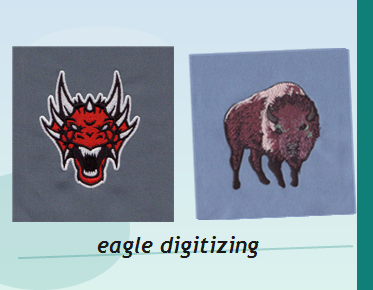
Fill stitch is helpful for mascot bodies, shields, and block shapes, but too much fill can create stiffness and distortion. Good digitizing for sports uniforms keeps fill areas balanced so the garment still moves comfortably.
Match Density to the Fabric Type
Heavy density on lightweight tees can pucker, while loose density on fleece can look thin and unstable. The right embroidery density depends on the fabric, thread direction, and underlay, especially when the apparel is sold in multiple sizes and colorways.
Watch Small Lettering and Fine Detail
Many school logos include slogans, graduation years, or tiny mascot features that are difficult to stitch cleanly. Small text often needs simplification, and some details should be removed or resized to protect readability on a finished garment.
School Spirit Apparel Needs Fabric-Specific Planning
polo shirt logo digitizing is different from hoodie or jersey prep because the knit structure and placement can change how the stitches sit. A solid stitch plan considers pull compensation, stabilizer choice, and the way the fabric reacts after sewing.
Caps, Beanies, and Curved Surfaces Need Different Logic
School stores often sell hats for game day, alumni events, and fundraisers. A cap logo digitizing service helps control distortion on curved seams and keeps the logo legible where the front panel and structure naturally change shape.
Patches Can Solve Problems That Direct Embroidery Cannot
When a design is too detailed, too small, or too dense for direct stitch-out, a patch may be the better option. embroidered patch digitizing for businesses is useful for school spirit items that need consistent branding across jackets, bags, and resale merchandise.
Why Ecommerce Stores Need a Production Workflow
Online apparel stores cannot rely on one-off artwork tweaks for every order. They need repeatable file preparation, the right stitch sequence, and clean format output so each new school order runs the same way from sample to repeat production.
Ecommerce File Prep Should Include Proofing and Sew-Out Testing
Before launch, the file should be checked for shape cleanup, stitch balance, and realistic sizing on the intended apparel. Eagle Digitizing often supports this workflow by preparing embroidery files that are easier to review, test, and move into production without extra back-and-forth.
What Usually Goes Wrong With School Spirit Designs
The most common issues are thin letters that break, mascots with too much detail, logos that collapse on stretch fabric, and designs that look fine on screen but lose edge control in thread. A strong digitizing plan prevents those failures before the first run.
How to Choose the Right Stitch Strategy
Use satin stitch for borders and readable lettering, fill stitch for larger shapes, and running stitch for light detail or small accents. Then adjust underlay and pull compensation for the apparel, because the same school logo may need a different setup on fleece, pique, or performance fabric.
How to Submit Art for a Faster Quote
Send the cleanest version of the logo you have, plus the target garment, logo size, and placement. If the design will be sold across multiple items, note whether it will appear on polos, hoodies, hats, or patches so the file can be prepared correctly from the start.
FAQ
What is the best stitch type for school spirit logos?
Satin stitch is usually best for lettering and borders, while fill stitch works for larger mascot areas. The right mix depends on logo size, fabric, and how much detail the design contains.
Should school spirit designs be digitized differently for caps and polos?
Yes. Caps need curved-panel planning, while polos need fabric-friendly density and cleaner placement. Each garment changes how the stitches sit, so one file may need different setup logic.
When should a school logo become a patch instead of direct embroidery?
Use a patch when the logo is too detailed, too small, or needs repeatable branding across many products. Patches can preserve design detail better than forcing a crowded stitch file onto every garment.
For ecommerce brands selling school spirit apparel, the best results come from files that are prepared for the real garment, not just the mockup. Eagle Digitizing helps turn artwork into embroidery-ready files that support better stitch balance, cleaner branding, and fewer production surprises. Start Your Embroidery Project with a clear logo, a garment list, and a target size so your next school collection is ready to stitch with confidence.