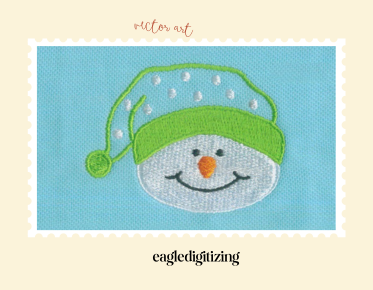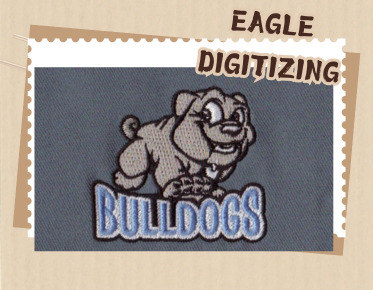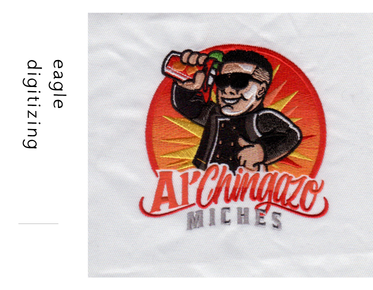

How can consistency be maintained across different embroidery sizes?
Consistency is maintained by digitizing for each size range instead of simply scaling one file. Keep stitch density, underlay, pull compensation, and thread direction adjusted to the garment so the logo stays balanced at every placement. For multi-size orders, start with embroidery design digitizing and upload your design for a quote.
Why resizing a logo in software often causes problems
When a design is stretched up or down inside embroidery software, the stitch relationships change even if the artwork looks the same on screen. A 3-inch logo may sew cleanly, while a 1.75-inch version suddenly crowds letters, loses corners, or shows gaps.
Think in size families, not one universal file
The most reliable production workflow starts with a master version built around the smallest approved size, then fine-tunes larger placements from there. This approach keeps the logo readable on a left chest, a jacket back, or a cap without forcing one stitch plan to do every job.
Stitch density should match the size, not just the artwork
Stitch density controls how much thread is laid into the fabric, and that balance changes with scale. Too much density at a small size creates stiffness and distortion; too little density at a larger size makes the logo look thin and unfinished.
Underlay and pull compensation hold the shape together
Good underlay gives the top stitches a stable base, while pull compensation adds the extra width needed after the fabric shifts under tension. This is where an embroidery pull compensation service can protect circles, text, and borders from turning narrow or uneven.
Thread direction helps the design look intentional at every scale
Changing thread direction with the form of the logo can improve edge definition and reduce visual distortion. Curved fills, angled columns, and directional stitching help the embroidery keep its character when the design moves from a medium patch size to a smaller shirt placement.
Small lettering needs strict production rules
One of the biggest client complaints is that brand names look sharp in artwork but blur on fabric. Small lettering has real limitations in embroidery, so letters may need spacing adjustments, simplified shapes, or a larger minimum size to stay legible and consistent.
Clean artwork first, then prepare the stitch plan
A design can only stay consistent if the source art is clean. Vector cleanup removes stray points, uneven curves, and low-resolution edges that create different results from one size to another. Many brands rely on embroidery digitizing services to prepare artwork before the stitch plan starts.
Fabric compatibility changes how the same file behaves
A logo sewn on cotton twill will not behave the same way on fleece, nylon, or a structured cap. Stretch, thickness, and surface texture affect registration and pull, so the digitizing should be adjusted for each fabric type instead of reused blindly across every garment.
Caps, jackets, and left chest placements need their own logic
Placement matters as much as size. cap embroidery digitizing has to deal with seams and curvature, while jacket backs can support more detail and density than a small chest mark. A file that works on one placement may need real revision on another.
Always test the important sizes before full production
Sew-out testing is the fastest way to spot problems before an order goes live. Test the smallest and largest versions, then compare edge sharpness, fill balance, and text readability. If the samples do not match the brand standard, revise the file before production begins.
Use a file preparation workflow that supports repeat orders
For brands and decorators, consistency improves when every file is documented with size notes, fabric notes, and placement details. That makes future reorders easier and protects the look of the logo across new apparel runs, seasonal colors, and different machine setups.
When to adjust the file instead of forcing a resize
If a logo loses detail at one size, the answer is not always to make it smaller or bigger again. Sometimes the fix is to simplify a segment, widen a stroke, or rebuild a fill region so the design stays production-friendly and visually stable across the full size range.
How professional digitizing supports brand consistency
Professional planning turns artwork into production-ready embroidery files that can be reused with fewer surprises. That is especially helpful for uniform programs, promotional apparel, and fashion drops where the same logo must look sharp on multiple garments, materials, and stitch counts.
What customers should send before quoting
To get the most accurate result, send the artwork, target sizes, garment type, and placement details before production starts. Clear input reduces revision time and helps the digitizer choose the right density, underlay, and stitch direction for the full order.
FAQ
How do you keep embroidery the same across different sizes?
Use size-specific digitizing rules for density, underlay, pull compensation, and stitch direction. Do not rely on a simple scale-up or scale-down inside software.
Why does small embroidery lose detail faster than larger embroidery?
Small embroidery has less space for stitch angles, letter spacing, and fill areas. When the design gets too tight, details merge and the logo becomes harder to read.
Should every size get a sew-out test?
Test the sizes that matter most, especially the smallest and the largest versions. Those samples usually reveal the biggest consistency issues before production begins.
If you want every placement to look like the same brand, start with a file built for real production, not just a larger or smaller graphic. Eagle Digitizing helps brands turn artwork into machine-ready files that hold up across sizes, placements, and fabrics. If you need the best digitizing service for embroidery, Contact Us today to get a quote and start your next project with confidence.