
How Can You Prepare Low-Quality Artwork for High-Quality Vector Conversion?
In the world of digital design, converting low-quality artwork into high-quality vector graphics is a valuable skill. Vector graphics are essential for various applications, including screen printing, promotional materials, and digital media, because they retain clarity and detail when scaled to different sizes. However, preparing low-quality artwork for vector conversion can be challenging. This comprehensive guide will explore the steps necessary to achieve high-quality vector results from less-than-perfect original images.
Understanding the Basics of Vector Conversion
Before diving into the preparation process, it's crucial to understand what vector conversion entails. Vector graphics use mathematical equations to represent images, which allow them to be resized without losing quality. Unlike raster images, which are composed of pixels, vectors consist of paths defined by points, lines, and curves. This makes vectors ideal for artwork that requires frequent resizing or high-resolution output, such as brand logos and promotional graphics.
Evaluating Your Artwork
The first step in preparing low-quality artwork is to critically evaluate the image. Identify areas that are too blurry, lack contrast, or are excessively complex. Simplifying these areas can significantly enhance the final vector quality. If the image is a logo or a similar graphic, ensure that the design is as clear as possible and any textual elements are legible. Admission that some low-resolution details might be impossible to recover is essential; prioritize the elements most crucial to the final piece.
Enhancing Image Quality
Once you've evaluated the artwork, you may need to enhance the image quality before vectorizing. Brightness, contrast, and saturation adjustments can help make the critical elements of the artwork stand out. Using software like Adobe Photoshop or GIMP, apply filters selectively. Detailing such as outlines or significant color areas should be clarified, reducing noise and enhancing distinguishable features. At this stage, it's also recommended to correct colors to ensure they align with the desired output.
Choosing the Right Vector Conversion Tools
Choosing the right tool is vital for effective vector conversion. There are many vectorization tools available, ranging from professional software options like Adobe Illustrator to online converters such as Vector Magic. For precision tasks, professional tools typically come equipped with advanced settings that offer greater control over lines, curves, and color handling.
Manual Vector Tracing
When dealing with intricate designs or particularly low-quality artwork, manual vector tracing may be necessary. This involves using vector software to trace the outlines of your artwork point by point. While time-consuming, this method provides the greatest accuracy and control over how each element of your image is converted. Pay close attention to adjusting nodes and paths to accurately replicate curves and angles.
Utilizing Professional Services
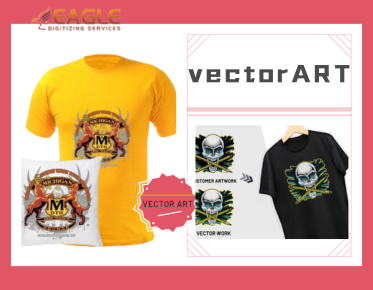
For those who require high-quality results without the time to learn or execute the conversion themselves, professional services offer an effective solution. Companies like Eagle Digitizing provide dedicated vector art services and are well-equipped to handle complex conversion projects. Their skilled team can manage everything from simple raster to vector conversion to detailed color correction, ensuring the highest fidelity to the original design【4:0†source】.
Preparing for Vector Conversion
Preparing your artwork also involves setting the correct resolution and ensuring the image is saved in a compatible format—typically, PNG or TIFF for high-quality inputs. As you prepare your image, consider any additional elements such as text or lines that might need to be manually added or enhanced post-conversion.
Applying Post-Conversion Adjustments
After converting to vector format, further adjustments may be necessary. These adjustments include refining line weights, color grading, or adding unique details that make your artwork stand out. Programs like Illustrator offer a wide array of tools to tweak individual elements in your vectorized image, ensuring that final adjustments align with the desired artistic vision.
The Role of Different Industries
Various industries utilize vector graphics for a multitude of reasons. Marketing agencies, for example, prefer vectors for their adaptability across promotional materials. Manufacturers like those producing custom t-shirts or banners require vectors for high-quality prints. Having a vector art conversion service allows these industries to achieve consistent and professional results across all forms of branded materials【4:4†source】.
Trends in Vector Conversion
With the advances in artificial intelligence, vector conversion software continues to improve, offering more efficiency and better handling of low-quality inputs. Future developments will likely include more intuitive applications that require less manual input, thereby broadening access to quality vector graphic design across various skill levels.
As technology advances, the avenues for enhancing and converting artwork will only broaden, allowing graphic designers and businesses alike to create impressive vector images from less-than-perfect originals.
Conclusion
Whether you decide to use online services, software programs, or professional services like Eagle Digitizing, the choices available for vectorizing artwork have never been more diverse or robust. By beginning with a critical evaluation and enhancing what you have, even low-quality artwork can be transformed into a professional-level vector, ready for any application. Consider the tools and services that align best with your needs to achieve the best outcomes.
With this guide, you are now equipped to transform any piece of art into a high-quality vector graphic, boosting its versatility and visual appeal for any professional requirement. What innovative solutions do you think the future holds for vector conversion technology?